Ergonomic
Fast Audio Organization Tool
Built for audio pros who value speed: keyboard-first workflows, fingerprint dedup, and true file mapping.
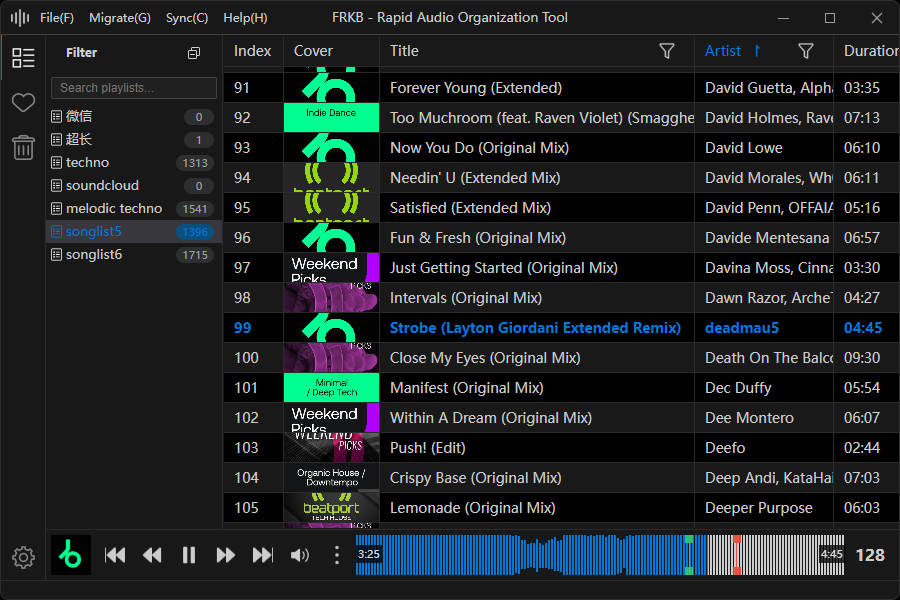
Key Features
From import and dedup to preview and export, every step stays fast and file-true.
Keyboard-First Efficiency
Frequent actions are mapped to shortcuts to reduce mouse travel.
Fingerprint Dedup
Import and playlist dedup with content-fingerprint or file-hash modes.
WYSIWYG File Mapping
On-screen structure mirrors real folders for true file-level organization.
Waveform-Driven Preview
Three waveform styles plus list previews with playback range.
BPM & Key Analysis
Background BPM/key analysis with Tap Tempo correction.
Metadata & Artwork
Edit tags and covers with MusicBrainz/AcoustID auto-fill.
A Workflow Built for Speed
Four steps cover the full lifecycle: import, preview, decide, and ship.
Create Library & Map Folders
Choose a library location; Filter/Curated libraries are created and synced to disk.
Drag in & Choose Dedup
Pick fingerprint-library or batch-only dedup, plus optional delete-after-import.
Preview & Decide Fast
Waveform preview, BPM/Key, and shortcuts speed up screening.
Move, Export, Recycle
Move to Curated, export to a folder, or use the Recycle Bin—disk stays in sync.
Capability Matrix
Everything you need to clean, analyze, and organize audio—without leaving the app.
Fingerprint & Dedup
- Content fingerprint / file-hash modes
- Import dedup: library or batch-only
- One-click playlist dedup
- Batch analyze or manual add fingerprints
- Export/import fingerprint DB + cloud sync (key required)
Libraries & Organization
- Filter/Curated dual-library flow
- WYSIWYG file mapping with disk sync
- Drag-in import and drag-to-move
- Drag out copies to Explorer/Finder
- Export to folder with optional delete
- Recycle Bin restore / permanent delete
- Auto sync on library folder changes
Playback & Analysis
- Background BPM/key analysis
- Tap Tempo correction
- Classic/Camelot display
- Playback range selection
- Auto play next
- Output device selection
Waveform & View
- SoundCloud / Fine / RGB waveforms
- Half / full waveform modes
- List waveform preview column
- Columns drag-reorder / hide / resize
- Text, duration, BPM filters
- Filters can persist across restarts
Metadata & Artwork
- Edit track metadata
- Replace and save cover art
- MusicBrainz search
- AcoustID fingerprint match
- Batch auto-fill
Format Conversion
- Batch convert to many formats
- New file or replace original
- Preserve metadata
- Optionally add fingerprints
System & Maintenance
- External tracks for temporary playback
- Open in Explorer/Finder
- Windows context menu: Play in FRKB
- Global shortcuts
- Update checks & prompts
- Configurable scan formats
- Chinese/English UI
FAQ & Transparency
Clear answers about syncing, privacy, and platform support.
Does FRKB upload my audio?
No. Cloud Sync only syncs SHA256 fingerprints, not audio or tags.
Do I need internet?
Local organization/playback/dedup work offline. MusicBrainz/AcoustID, Cloud Sync, and update checks need a connection.
What’s the difference between fingerprint modes?
Content fingerprints are based on audio content; file hash uses the file itself. They serve different dedup needs.
How do I use an AcoustID key?
Add your Client Key in Settings to improve matching and avoid public rate limits.
Is there a Linux build?
No official Linux build yet.
How do updates work?
FRKB checks for updates and shows prompts; downloads are confirmed by you.
System Requirements
- Windows 10 or later (x64)
- macOS 12 or later
- No official Linux build yet
Supported Formats
MP3, WAV, FLAC, AIF, AIFF, OGG, OPUS, AAC, M4A, MP4, WMA, AC3, DTS, MKA, WEBM, APE, TAK, TTA, WV
Scan formats can be configured in Settings.